



Welcome to DIVENX
Plain-English articles and calculators for owners who need clear hiring and compensation estimates.

Get clearer hiring cost and owner pay estimates

Built for small business owners who need clearer hiring and pay numbers.
Free
Full & itemized
Welcome to DIVENX

Two free calculators and open articles help small-business owners estimate hiring cost and owner pay from their own numbers, instead of a flat 1.3x wage guess.

Abstract background
1.2–1.45x
Typical fully loaded hire range
Wage alone usually understates total cost
2
Free calculators
Hiring Cost and Owner Compensation
$29
/mo or $290/yr
Save, compare, export, and planning dashboard (Beta)
Full
Itemized estimates
Built for owners who revisit the model
Focus
Hiring Cost
Owner Comp
Articles
Pro Tools
Hiring Cost
Owner Comp
Articles
Pro Tools

Clear models for hiring and owner pay

Most owners guess a hire at wage times 1.3. The real number often lands between 1.2 and 1.45 depending on state, role, and class code.
Start with
  • Hiring Cost: payroll taxes, workers comp, benefits, PTO, equipment, onboarding, overhead
  • Owner Compensation: profit, working capital, retained earnings, tax set-aside
  • Articles on pricing, margins, cash flow, hiring, and planning
Free to use
Try the tools
Why DIVENX
Clear estimates
See the full cost of a hire beyond wage
Owner draw models
Compare draw scenarios against working capital needs
Abstract background
Clear estimates
See the full cost of a hire beyond wage
Revisit the model
Update inputs as roles, states, or benefits change
No advice claims
Educational tools only. You enter the numbers.
Itemized detail
Free, full, and itemized views when you need more detail
Pro when useful
Save, compare, export, and a planning dashboard (Beta) for $29/mo
Tools

Run the numbers before you decide

Two free tools with complete itemized results. No account. Pro is only for keeping what you produce.

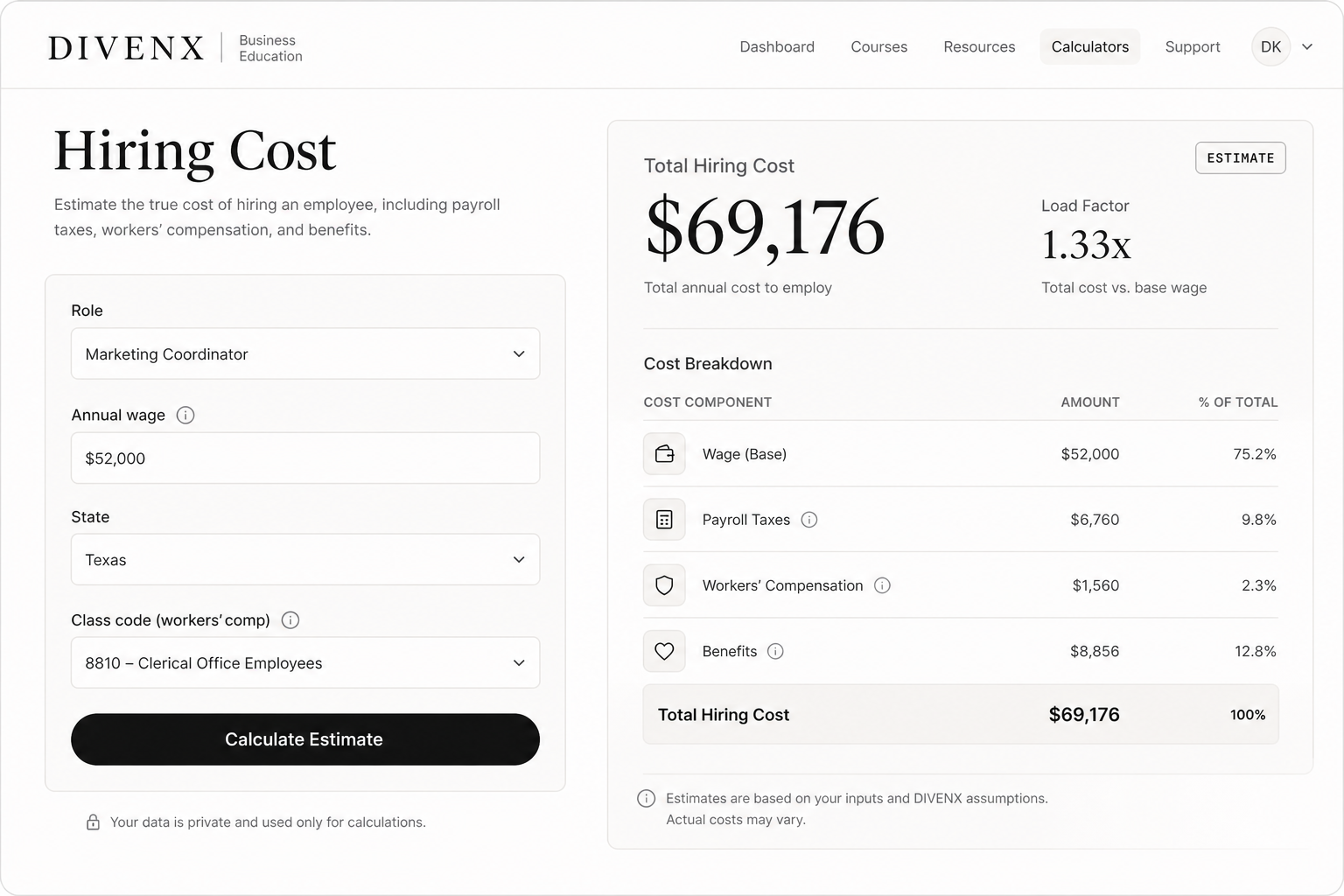
01 · Hiring Cost

What a hire may actually cost

Wage plus payroll taxes, workers comp, benefits, PTO, equipment, onboarding, and overhead. Compare the result with a flat 1.3x shortcut.

Free · no account Free / full / itemized State & class code
Hiring Cost calculator
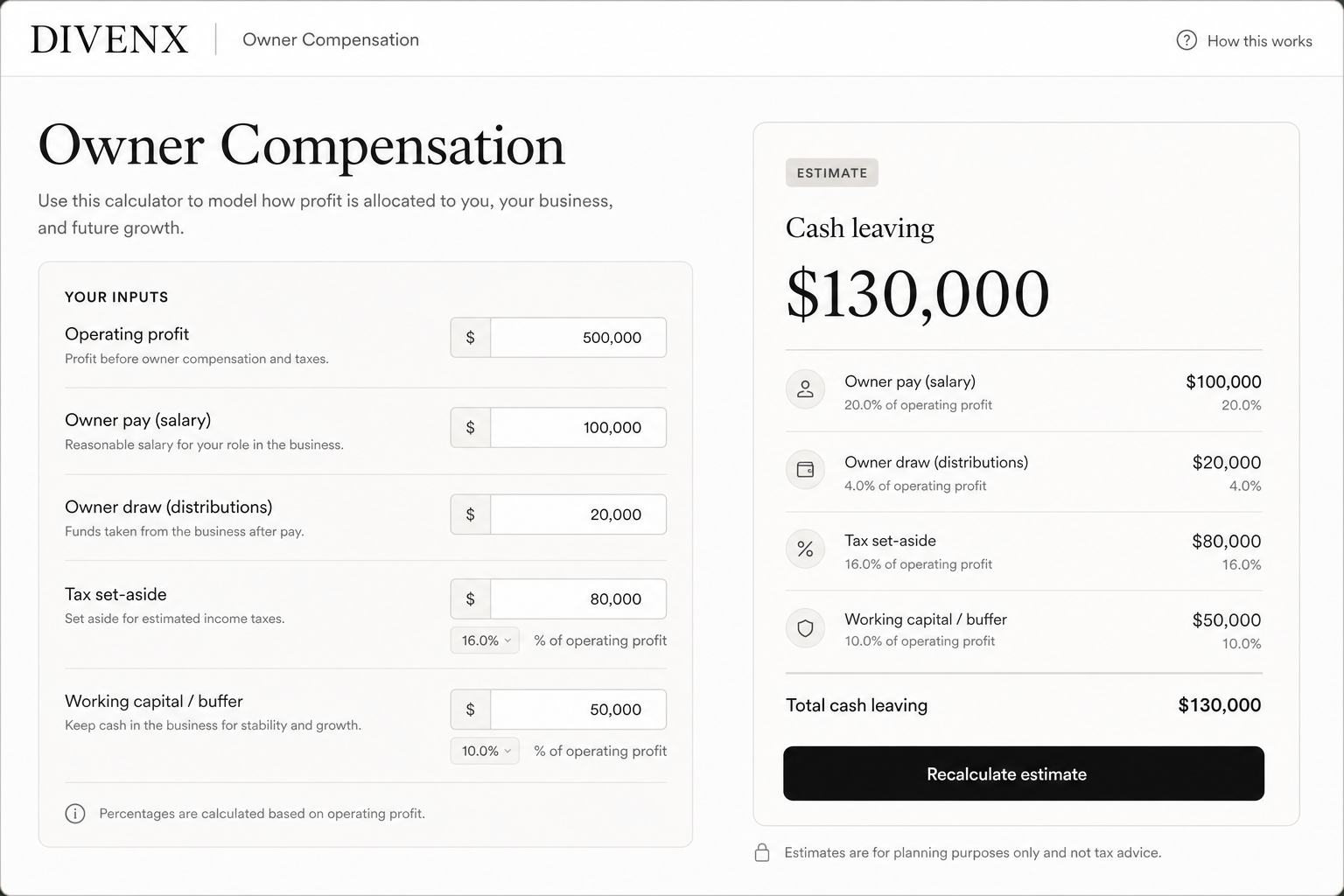
02 · Owner Compensation

Model pay, draw, and reserves

Separate owner pay and draw from working capital, retained earnings, and tax set-aside. Built only from the figures you enter.
Free · no account Pay + draw Reserve targets
Owner Compensation calculator

Want to save, compare, or export scenarios? That is DIVENX Pro, after you have an answer.

See Free vs Pro
Case Study
Abstract background

Multi-location retail hire model

An owner needed a clearer hire model before adding staff across locations. They used Hiring Cost to compare fully loaded estimates by role and state.
Challenge
Wage times 1.3 left a gap of thousands per role
Approach
Built side-by-side estimates with taxes, workers comp, benefits, and overhead.
Result
Clearer range
Fully loaded cost modeled before posting roles
More stories
How it works

Enter your numbers, review the estimate, then save and compare when you need Pro.

Abstract background
01
Enter your inputs
Add wage, state, role, benefits, and overhead assumptions into Hiring Cost or Owner Compensation.
Abstract background
02
Review the estimate
See free, full, or itemized views so you can compare what changes the total.
Abstract background
03
Revisit later
Update the model when headcount, benefits, or cash needs change. Pro can save and export.
Who it's for

Small-business owners

Multi-location retail hire model

Model hire cost across locations and class codes before you post the role.
Read case study

Service firm owner-draw scenarios

Compare owner draw scenarios against working capital and tax set-aside.
Read case study

Manufacturer multi-role compare

Multi-role compare for shop floor and office hires with workers comp in view.
Read case study

Growing teams

Built for owners who want clearer payroll and draw estimates as the team grows.
Learn More
Abstract background
Reviews

Owners who run the numbers first

Feedback from people who used the calculators and articles to think through a hire or an owner draw.
"I finally saw the full cost of the role, not just the wage. That changed how we planned the hire."
Jordan Lee
Owner, service firm
"The owner compensation model helped me separate what I wanted to draw from what the business could support."
Sam Rivera
Small-business owner
"Clear assumptions, itemized results. No hype. Exactly what I needed before posting the role."
Jordan Hale
Ops lead, manufacturing
Compare

Guessing vs modeling

Wage times 1.3 is a shortcut. A clearer model shows taxes, benefits, and overhead in plain numbers.

Common shortcuts

What DIVENX shows

Wage times 1.3 guesses
Fully loaded hire estimates
Owner draw by feel
Draw after working capital and tax set-aside
One-time spreadsheets
Models you can revisit
Hidden workers comp and benefits
Itemized cost lines you can inspect
Advice-shaped promises
Educational estimates from your inputs
Abstract background
Ready to run your numbers?
Try the tools
FAQ

Questions owners usually ask

Plain answers about the calculators, articles, and what Pro includes.
Abstract background
Still stuck on the software?
Contact support
Contact support
Who is DIVENX for?
Small business owners who need clearer hiring and owner pay estimates before they commit.
Are the calculators free?
Yes. Hiring Cost and Owner Compensation are free with full and itemized views. The calculators stay free with or without Pro.
What does Pro include?
Save, compare, export, multi-role, and Dashboard Beta for $29/mo or $290/yr. No consulting or advice.
Does DIVENX give tax or financial advice?
No. DIVENX provides educational tools and articles. Estimates depend on inputs you enter.
How do I get support?
Email support@divenx.com or use the Contact page. Support covers the software, not advisory work.
Get started

See what a hire or owner draw may cost

Run a hiring or owner compensation estimate from the figures you enter. Keep scenarios with Pro when you are ready.

DIVENX
Business education for owners
Open Hiring Cost